



EVERY creator starts with a spark: a small idea, a messy sketch, a couple of seconds of footage, or just an image. But that leap from the spark to a polished, cinematic YouTube intro often feels like a canyon that only professional editors can cross. Not anymore, though. Thanks to tools such as Pippit, along with a little magic from an AI video generator free, beginners can produce intros that look like they’re made in a full studio-even without editing knowledge or expensive software.
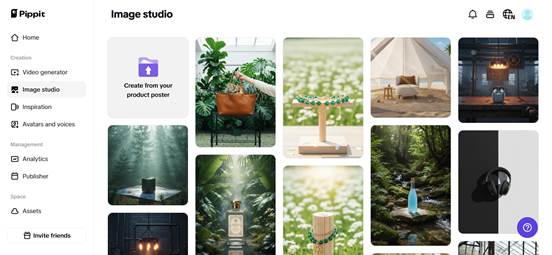

Pippit takes the intimidation out of video creation. It doesn’t treat you like a technician; it treats you like a storyteller. Instead of wrestling with layers, timelines, and plug-ins, you simply describe what you want-and watch your idea transform into motion, energy, and style. Whether you’re launching a gaming channel, a cooking series, a tech review show, or a travel vlog, Pippit gives you the cinematic toolkit you always wished you had.
In this blog, we’ll go over how beginners go from zero to show-stopping intros, simple concepts evolve to polished sequences, and AI effects turn everyday creators into visual directors. You’ll also get a full walkthrough of Pippit’s YouTube intro creation steps so that you can make your first intro by the end of this read.
Where simple ideas become cinematic: the beginner’s secret advantage
If you’ve ever opened traditional editing software and instantly felt overwhelmed, you’re not alone. The timeline looks like chaos. The effects panel looks like a spaceship dashboard. And the tutorials? They come in forty-minute doses.
But Pippit turns this around; instead of demanding expertise, it offers creativity without pressure.
But beginners have one advantage: they think simple. They imagine intros as moments, not complex sequences. They envision glowing text, smooth zooms, animated logos, or quick flashes of personality — and AI completes these simple thoughts as fully designed motions.
Effects that feel like movie magic
Pippit combines automated motion design, dynamic transitions, and animation tools in one place to make even the tiniest ideas feel cinematic. Want your logo to burst like light? Want your character avatar to speak? Want your scene to float in frame like a movie opening? All possible without touching keyframes or node graphs.
When creators add enhancements powered by AI lip sync, even voice-driven intros start looking like studio-led productions.
The storytelling pulse: crafting intros that build anticipation
A cinematic intro is not just beautiful, it’s emotive. No matter if your style is bold, dreamy, dramatic, or calming, intros have a very important purpose: preparing your viewers for the journey ahead.
Many beginners underestimate the power of timing. A second’s delay can dull the energy; a second’s cut can sharpen it. Pippit automates pacing, synchronizing visuals with narration or music, to make intros feel intentional even if you are touching editing tools for the first time.
Letting your niche shape your cinematic style
Every category on YouTube offers different cinematic opportunities.
- Metallic glows
- Futuristic HUD graphics
- Crisp sound swipes
- Soft overlays
- Pastel animations
- Gentle text reveals.
- Glitch bursts
- Neon streaks
- Cinematic filter packs
- Clean diagrams
- Bold typography
- Streamlined transitions
With Pippit, you don’t have to rely on complicated plugins to explore these styles, for the cinematic effects are baked right in, and very beginner-friendly.
When aesthetics find motion: transforming your vibe into animation
Even if your brand is no more than a color palette with a basic logo, motion can make it unforgettable.
Let your personality animate itself
It’s the motion that often helps creators find their brand identity. One swirl animation might define your whole visual language. A certain glow may become your signature. A text reveal may spark a theme for your whole channel.
Your logo as your leading character
Add the right animation effects and your logo becomes an emotional cue, a cinematic symbol, and a visual handshake. AI automatically applies transitions, depth, timing, and motion arcs that would normally take hours to keyframe manually.
The cinematic workshop: shaping your intro inside Pippit’s intuitive flow
Now it gets really fun. Consider this section as the creative control room in which no experience is needed and no technical barriers get in the way, just storytelling and motion. Here’s how you can use Pippit’s YouTube intro maker to create personalized intros:
Step 1: Upload media for intro generation
Head to the Pippit, create your account, and open the Video generator. Start by pasting your product link or clicking Add media to import images or clips. Add your product highlights and use the More information section to specify your ideal audience. Then attach your logo and click Generate. This instantly forms your intro draft – the cinematic seed ready to grow.


Step 2: Modify the YouTube intro
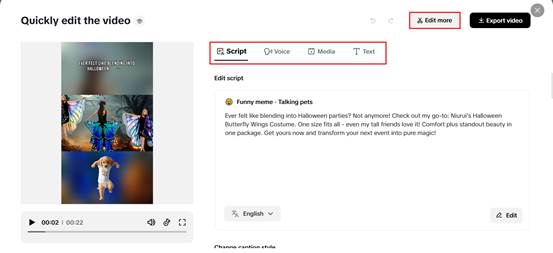
When your intro loads, use Quick edit to perfect elements such as caption styling, script tone, voiceover character, or avatar. Want more creative control? Use Edit more to launch the full editor. Combine this intro with your full video, transition and make sure the aspect ratio is locked in at 16:9 for YouTube. This step is where beginners start to feel like directors.

Step 3: Export the YouTube intro to your device
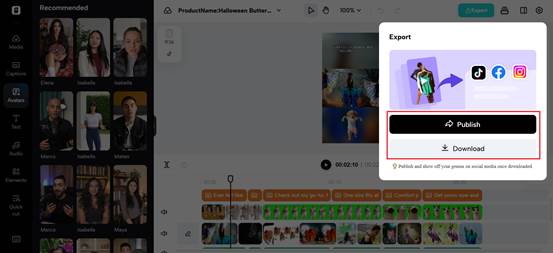
When you’re satisfied with the pacing, visuals, and motion, tap Export. Select Download, then select your resolution, frame rate, and overall output quality. Tap Export again, and your intro saves to your device, ready to be uploaded to your channel.
Micro-stories in motion: crafting standout intros in a busy world
The creators with the best intros aren’t the ones with the best equipment; they’re the ones who know how to tell a micro-story.
This doesn’t mean your intro needs to be long; it needs to be alive: a flash of personality, a slice of narrative, a spark of identity. It always seems to beginners that only pros can make moments feel cinematic, but with Pippit’s effects, even a three-second opening can feel like a blockbuster teaser. “Super.”
Conclusion: your cinematic journey starts with one simple idea
You don’t need a studio, you don’t need years of experience, and you definitely don’t need complex editing skills. What you do need is one spark, one small idea that you want to bring to life. With Pippit and its AI video generator free, that spark turns into a cinematic intro worthy of your channel. Start small, experiment boldly, let the creativity guide the motion.
Your YouTube intro is the opening scene of your story, and Pippit is ready to help you make it unforgettable. Create your cinematic YouTube intros today with Pippit, and give your channel the stunning entrance that it deserves.